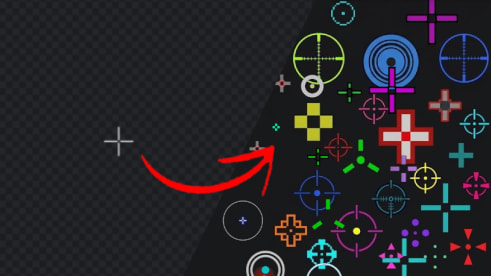
You've probably seen the phrase "crosshair overlay" floating around gaming Discords, Reddit threads, and your favorite streamer's setup video. And if you're new to it, it's easy to be confused. Is it a cheat? A mod? Some kind of hardware thing?
Good news: it's none of the scary stuff. A custom crosshair overlay is one of the simplest, safest quality-of-life upgrades you can make to your FPS setup — and a crosshair overlay like HUDAim makes it a two-minute job. Once you try one, you'll wonder how you ever played without it.
Here's everything you need to know — in plain, no-fluff gamer language.
What Is a Custom Crosshair Overlay?
A custom crosshair overlay is a small program that draws a crosshair on top of your screen, independent of whatever game you're playing.
The key word is overlay. It doesn't change your game, edit your files, or mess with how the game renders. It just paints a crosshair over your display so you always have a crisp, visible aiming point — no matter which title you're in.
Think of it like a sticker on your monitor, except it's digital, you can move it, recolor it, and turn it off whenever you want.
That's why a tool like HUDAim works across practically any PC game — because it doesn't care what game is running. It only cares about your screen.
How a Crosshair Overlay Actually Works
Most crosshair overlay apps work the same way:
- You pick or design a crosshair (color, shape, size, opacity — the works).
- You position it where you want it on your screen.
- You launch your game, and the crosshair sits on top, ready to go.
Because it's a pure overlay, there's no injection into your game, no memory reading, and no file modification. Your game runs exactly as it was installed. That's a big deal, and we'll come back to why it matters in the anti-cheat section below.
For newbies, this also means setup is basically: download, pick a crosshair, play. If you want the full walkthrough, HUDAim's official site has a guide for the nitty-gritty details.
Why Gamers Use a Custom Crosshair Overlay
There are a few big reasons, and they're all pretty simple.
1. Your Default Crosshair Disappears
We've all been there. The default crosshair blends into a bright sky, a dark corner, or a cluttered map, and suddenly you're aiming by vibes alone. A high-contrast custom crosshair stays visible no matter the background.
2. Consistency Across Every Game
Every game draws its crosshair differently. Different colors, sizes, shapes, opacity. Switch from one game to another and your muscle memory has to reset. An overlay lets you run the same crosshair in every game, so your aim feels familiar from the first match.
3. Total Personalization
Want your team logo in the center? A funny GIF? A weird little shape you drew yourself? A good overlay tool lets you go full custom. It's your crosshair — make it yours.
4. No Messing With Console Commands
Some games let you change your crosshair, but only through config files or console commands you need a wiki to figure out. An overlay skips all that headache.
Is a Custom Crosshair Overlay Cheating?
This is the question every smart player asks, so let's answer it straight.
No — a crosshair overlay is not a cheat. It's a visual aid, the same way a bright monitor or a good pair of glasses is. It doesn't aim for you, it doesn't reveal enemies, and it doesn't read game data.
What makes a tool safe or sketchy comes down to how it works:
- A pure overlay (like HUDAim) only draws on your screen. It never touches your game files, memory, or process — so there's nothing for anti-cheat to flag.
- An injector or memory reader would be a different story. That's where things get bannable.
As long as you stick with a clean overlay that doesn't inject, you're in safe territory. This is exactly why tools like HUDAim emphasize that they're a pure overlay by design.
What to Look For in a Crosshair Overlay
Not all overlays are created equal. Here's a quick checklist of features worth having.
- Customization depth — colors, shapes, sizes, opacity, blur, rotation, and scale. The more control, the better.
- A draw tool — so you can sketch a truly unique crosshair when presets aren't enough.
- A community library — grab designs other players made, or share your own.
- Image overlays — drop in a PNG or GIF for extra personality.
- Hotkeys — swap crosshairs or toggle the overlay mid-game without tabbing out.
- Low resource usage — you don't want an overlay eating FPS during a clutch.
- Fullscreen support — it should work whether you run fullscreen or windowed.
HUDAim checks most of these boxes out of the gate, which is part of why it's been picking up steam as a solid Crosshair X alternative.
Custom Crosshairs for Your Favorite Games
Here's how a custom crosshair overlay shows up in the titles you actually play.
CS2 — A Crosshair You Can't Lose
Counter-Strike is the crosshair game. A crosshair overlay for CS2 gives you a crisp, high-contrast reticle that stays visible through smokes, dark corners, and bright sites. When crosshair placement is the difference between a whiff and a one-tap, seeing your crosshair is half the battle.
Rainbow Six Siege — Steadier Aim on Tight Angles
Siege is pixel peeks and instant headshots. A clean custom crosshair gives you a steady reference point while you're pre-aiming a drone hole or holding a long angle, so you're already on target when the swing happens.
Apex Legends — Stay Anchored at Full Speed
Apex is nothing but movement — sliding, zipping, wall-bouncing. A crosshair you've tuned yourself acts as a mental anchor, helping you re-center faster when the fight turns into chaos.
PUBG — See It From 200 Meters Out
PUBG maps are huge and busy. When you're scanning tree lines and windows at range, a high-visibility custom crosshair keeps your aim honest whether you're on a bolt-action or holding down full auto.
Rust — Consistency in a Game With None
Rust players know the struggle: the spray, the aim cone, the chaos. A stable custom crosshair overlay gives you one reliable constant in a game that offers exactly zero.
WarDogs — Clear Sights, Cleaner Fights
When the objective fight gets loud, a visible, tuned crosshair helps you snap to targets faster so you can focus on the play instead of squinting at the default reticle.
MW4 (Modern Warfare 4) — Sharp in the Chaos
Call of Duty is fast. A crisp crosshair keeps you locked during the slide-cancels and split-second face-offs where the first bullet wins the fight.
ARC Raiders — Ready Day One
New shooters ship with their own crosshair quirks. A game-agnostic overlay like HUDAim is ready whenever the game is — no waiting for the devs to add the color slider you wanted.
The takeaway: across every one of these games, the win condition is the same — a crosshair you can see clearly, tuned to your taste, and consistent from title to title.
Crosshair Overlay Tools Compared: Crosshair X, HudSight & HUDAim
If you've been searching for a crosshair overlay, you've probably run into the same names over and over. Here's the quick, honest rundown.
| Crosshair X | HudSight | HUDAim | |
|---|---|---|---|
| Reputation | The established veteran | Reliable fullscreen favorite | The fresh alternative |
| Standout | Huge community & deep customization | Clean crosshair library, no input lag | Draw tool, magnifier & community library |
| Best for | Power users who want the most options | Set-and-forget simplicity | Newbies wanting features without the clutter |
The short version: Crosshair X has been around longest and has the biggest community, so there's a crosshair for every taste already made. HudSight is the dependable pick, known for solid fullscreen support and a clean library.
HUDAim is the newer face in the room, and it's built to compete — full appearance customization, a shape library, and image overlays, plus extras like a built-in magnifier, a draw tool for fully custom designs, and a community crosshair library to share and browse.
So which is best? Honestly, it comes down to taste. But if you're hunting for a HudSight alternative or a Crosshair X alternative that's easy to pick up as a newbie without skimping on features, HUDAim is worth a serious look. For the fine-print stuff like pricing and setup steps, their official site has everything you need.
Getting Started With Your First Overlay
You don't need a computer science degree for this. The basic flow is:
- Download a crosshair overlay (like HUDAim).
- Pick a design from the library or draw your own.
- Tweak the color, size, and position to taste.
- Launch your game and play.
That's genuinely it. Any deeper setup — specific hotkeys, image overlays, or multi-crosshair profiles — is covered in the official guide, so you can go as deep as you want after you're already up and running.
FAQ: Custom Crosshair Overlay
What is a custom crosshair overlay? A program that draws a crosshair on top of your screen, independent of your game, so you get a consistent, visible aiming point in any title.
Does a crosshair overlay work in fullscreen? Yes. Quality overlays like HUDAim are built to draw over your game whether it's fullscreen or windowed.
Is a crosshair overlay safe to use? Yes, when it's a pure overlay. It never injects into your game or reads memory, so there's nothing for anti-cheat to flag. The aim is still 100% yours.
Will a crosshair overlay get me banned? Not if it's a clean overlay that doesn't inject or modify game files. Steer clear of anything that claims to read game memory.
Does it affect my FPS? A well-built overlay runs light and won't noticeably affect performance. HUDAim, for example, is designed for low resource usage.
Which games work with a crosshair overlay? Practically any PC game — CS2, Rust, PUBG, WarDogs, MW4, ARC Raiders, R6 Siege, Apex Legends, and many more.
Is it hard to set up? Not at all. Most tools are pick-a-crosshair-and-play simple, with guides on the official site if you want to go deeper.
Final Thoughts
A custom crosshair overlay is one of those upgrades that seems small on paper but feels huge in practice. It won't aim for you — that part's still on you. But it will make sure you can actually see where you're aiming, keep your crosshair consistent across every game you play, and let you put a little personality into your setup.
If you're new to overlays and want something easy that doesn't skimp on features, give HUDAim a shot. Pick a crosshair, draw something dumb, and go see how it feels in your next match.